고정 헤더 영역
상세 컨텐츠
본문
728x90
Hey everyone 🙋♀️
Today, I’ve got a function that’s an absolute must in real-world Excel tasks —
Let’s talk about the COUNTIFS function! 🎯
This one helps you count cells based on multiple conditions.
Especially when working with dates or comparisons like greater than or less than, it's a total lifesaver 📆✨
What is COUNTIFS? 🤓
In a nutshell:
👉 It counts the number of cells that meet multiple criteria
=COUNTIFS(range1, criteria1, range2, criteria2, …)
You can include as many pairs of range and criteria as you want! 🧩
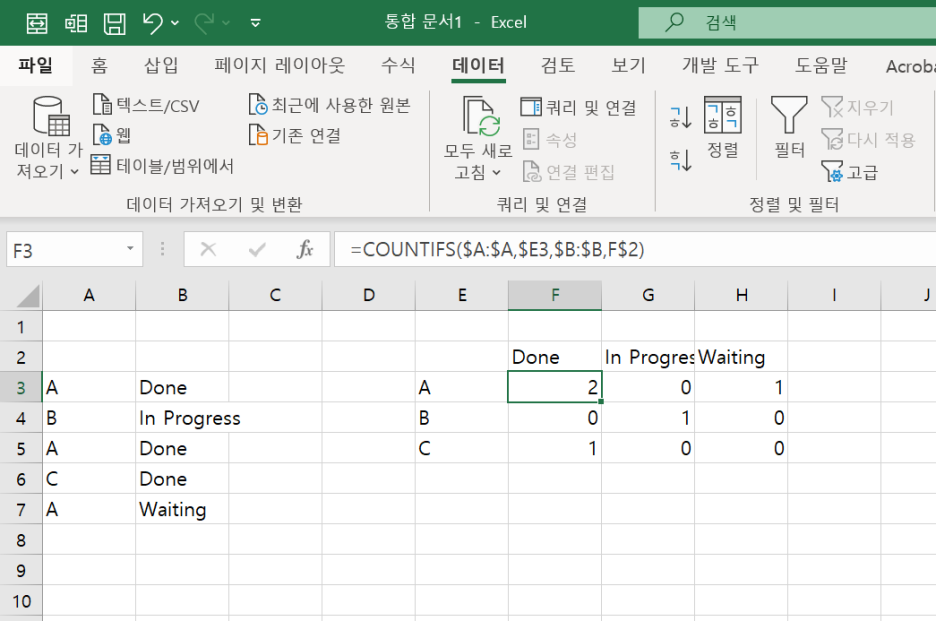
Example 1: Text Criteria 🎯
Column A (Name)Column B (Status)
| A | Done |
| B | In Progress |
| A | Done |
| C | Done |
| A | Waiting |
=COUNTIFS(A1:A5, "A", B1:B5, "Done")
👉 Returns 2
Because there are 2 rows where name is "A" and status is "Done" 💡
Example 2: Date Criteria 📅
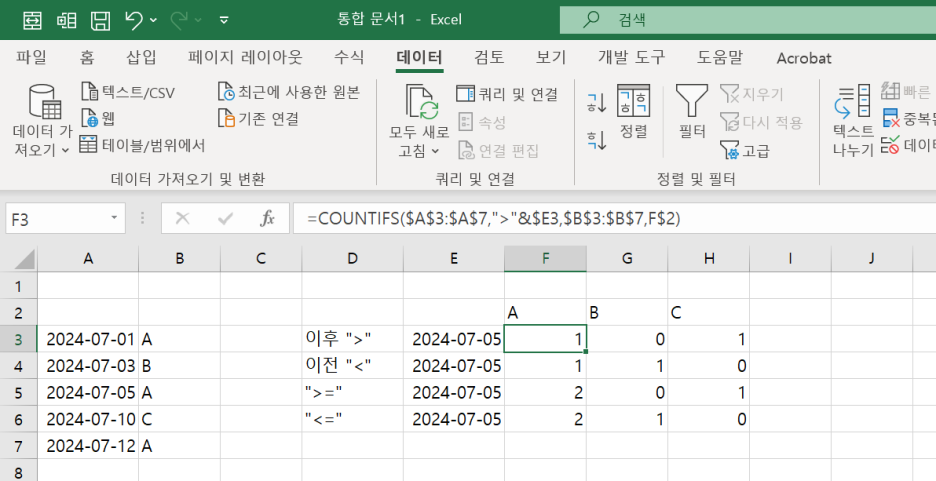
Column A (Date)Column B (Person)
| 2024-07-01 | A |
| 2024-07-03 | B |
| 2024-07-05 | A |
| 2024-07-10 | C |
| 2024-07-12 | A |
Want to count rows after July 5, 2024 where person is A?
=COUNTIFS(A1:A5, ">" & DATE(2024,7,5), B1:B5, "A")
👉 Returns 1 (only July 12)
For date comparisons, always use: "symbol" & DATE(...)
Example: ">=" & DATE(2024,7,1) ✅
Example 3: Number Criteria (Greater, Less, Equal) 🔢
Column A (Item)Column B (Stock)
| A | 150 |
| B | 80 |
| C | 100 |
| A | 50 |
| B | 120 |
Count rows where Item is A and Stock is 100 or more:
=COUNTIFS(A1:A5, "A", B1:B5, ">=100")
👉 Returns 1 (only the first row)
Quick Summary 💡
ConditionSyntax Example
| Equals | "=A" or just "A" |
| Greater than or equal | ">=100" |
| Less than or equal | "<=2024-07-10" |
| Greater than | ">50" |
| Less than | "<10" |
| Date-based filter | ">=" & DATE(2024,7,1) |
📌 Use quotes + ampersand for numbers and dates!
📌 Text values can be entered directly ✅
Final Thoughts ✨
The COUNTIFS function is perfect for:
✔ Filtering by date
✔ Using greater/less than comparisons
✔ Automating real-world reports!
Next time, we’ll dive into SUMIFS and AVERAGEIFS
to total or average values with conditions 💪
Got any Excel questions? Leave them in the comments!
Until then, happy Excel-ing 💻💚
728x90
'Excel' 카테고리의 다른 글
| 엑셀 실무 함수 📦 | INDIRECT 함수, 셀 주소를 자유자재로! 🎯 (0) | 2025.07.09 |
|---|---|
| 実務で使えるエクセル関数 🍀 | COUNTIFSで日付フィルターもバッチリ!📊 (0) | 2025.07.03 |
| 엑셀 실무 함수 🍀 | COUNTIFS 함수로 날짜 필터링까지 완벽하게! 📊 (0) | 2025.07.03 |
| Excelの便利技 🍯 | MATCH関数でデータの位置を特定!🔍 (0) | 2025.07.01 |
| Excel Tips 🍯 | Find Position with MATCH Function! 🔍 (0) | 2025.07.01 |


