고정 헤더 영역
상세 컨텐츠
본문
728x90
728x90
Hey everyone~! 🙋♀️
Today we’re looking at one of the most commonly used Excel functions:
calculating averages using AVERAGE and AVERAGEIFS 😊
✅ AVERAGE: Simple average calculation ✍️
The AVERAGE function is super straightforward!
=AVERAGE(number1, number2, ...)
Or:
=AVERAGE(range)
Example:
Column A
| 90 |
| 80 |
| 100 |
=AVERAGE(A1:A3)
👉 Result: 90
(90 + 80 + 100) ÷ 3 = 90 🎯

✅ AVERAGEIFS: Conditional average 🎯
When you want to average only values that meet certain conditions,
use AVERAGEIFS!
=AVERAGEIFS(average_range, criteria_range1, criteria1, [criteria_range2, criteria2]...)
📊 Example 1) Average score where name is "A"
Column A (Name)Column B (Score)
| A | 90 |
| B | 80 |
| A | 100 |
| C | 85 |
=AVERAGEIFS(B1:B4, A1:A4, "A")
👉 Result: 95
(Scores 90 and 100 for "A" → average is 95)

📅 Example 2) Average score after July 1, 2024
Column A (Date)Column B (Score)
| 2024-06-30 | 90 |
| 2024-07-01 | 80 |
| 2024-07-02 | 100 |
=AVERAGEIFS(B1:B3, A1:A3, ">=2024-07-01")
👉 Result: (80 + 100) ÷ 2 = 90

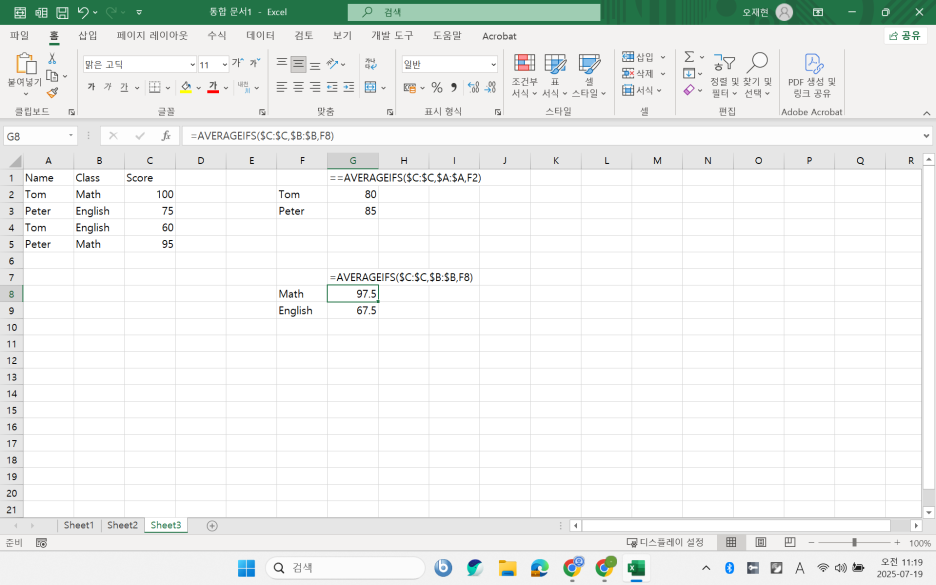
🧩 Example 3) Real-life use — average score by name and class
Column A (Name)Column B (Class)Column C (Score)
| A | 1 | 90 |
| B | 2 | 85 |
| A | 1 | 95 |
| A | 2 | 70 |
=AVERAGEIFS(C1:C4, A1:A4, "A", B1:B4, 1)
👉 Result: (90 + 95) ÷ 2 = 92.5
💡 Quick Comparison
FunctionUse CaseSupports Conditions?
| AVERAGE | Simple average | ❌ No |
| AVERAGEIFS | Filtered average (with criteria) | ✅ Yes |
✅ Summary
When calculating averages:
- No conditions? → Use AVERAGE
- With conditions? → Use AVERAGEIFS
It’s that simple! 👌
Next time, we’ll look at related functions like SUMIFS and COUNTIFS too.
Got questions? Drop them in the comments 💬
Until then — enjoy your smart Excel life! 💻💚
728x90
'Excel' 카테고리의 다른 글
| 엑셀 꿀팁 🍯 | ROW 함수로 넘버링 자동화 + 고급 활용까지! 🔢 (0) | 2025.07.23 |
|---|---|
| エクセル平均関数 🍀 | AVERAGEとAVERAGEIFSの使い分け ✨ (0) | 2025.07.19 |
| 엑셀 평균 함수 완전 정복 🍀 | AVERAGE vs AVERAGEIFS ✨ (0) | 2025.07.19 |
| Excel 実務関数 📦 | INDIRECT関数で動的な参照をマスターしよう!🎯 (0) | 2025.07.09 |
| Excel Power Function 📦 | Mastering INDIRECT for Dynamic References 🎯 (1) | 2025.07.09 |


