고정 헤더 영역
상세 컨텐츠
본문
728x90
When you need to sum data based on conditions in Excel, the most commonly used function is SUMIFS.
The SUMIF function can only be used when there is a single condition, but SUMIFS can handle multiple conditions simultaneously.
In practical work, SUMIFS is used far more frequently.
In this article, we’ll clearly organize everything from the basic structure of the SUMIFS function to practical examples and common pitfalls.
📌 Basic Structure of the SUMIFS Function
excel
SUMIFS(sum_range, criteria_range1, criteria1, [criteria_range2, criteria2], ...)
sum_range: The range of values to be summed
criteria_range1: The range to apply the first condition
criteria1: The first condition
criteria_range2, criteria2 …: The second, third conditions (can be added as needed)
📌 Note: With SUMIF, the condition comes after, but with SUMIFS, the sum range (sum_range) comes first!
Enter source
Example)

Step 1)
Copy the values from column F and paste them, then use “Remove Duplicates.”
Step 2)
Enter the formula as shown below.

What’s important here is:
=SUMIFS($G$4:$G$34,$F$4:$F$34,$J4)
G4:G34 is the range of numbers to sum
F4:F34 is the condition range
J is the condition.
The row length of the sum range and the condition range must be the same :) (Rows 4 to 34)
The $ symbol means “absolute reference.”
$G locks column G
$4 locks row 4
By keeping these locked, you can copy the formula downward without your condition references shifting.
If you want to apply multiple conditions,
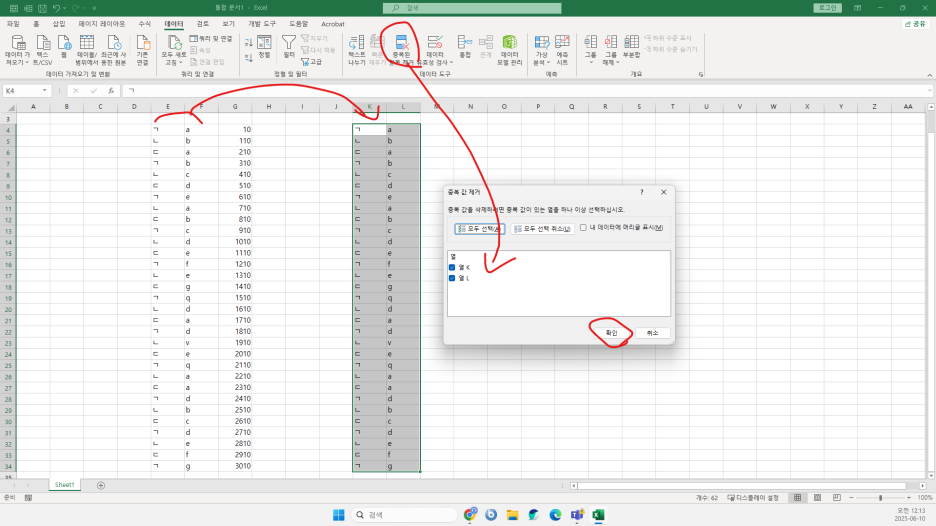
First, extract unique key values by removing duplicates as shown above.

=SUMIFS($G$4:$G$34,$F$4:$F$34,$L4,$E$4:$E$34,$K4)
=SUMIFS(sum_range, condition_range1, condition1, condition_range2, condition2)
Set it up like this.
By the way, you can use even more complex multi-conditions in SUMIFS.
If you're using dates, for example:

=SUMIFS($G$4:$G$34,$F$4:$F$34,$L4,$E$4:$E$34,$K4,$D$4:$D$34,"<="&$J$1)
=SUMIFS(sum_range, condition_range1, condition1, condition_range2, condition2, condition_range3 (date), date on or before 2025-04-04 (cell J1))
You can use it like this :)
If you have any questions, feel free to leave a comment and I’ll help you build the formula together!
728x90
'Excel' 카테고리의 다른 글
| 🇯🇵 日本語訳:🧮 Excel SUMPRODUCT関数 完全攻略:条件計算の最強ツール (0) | 2025.06.13 |
|---|---|
| 🧮 엑셀 SUMPRODUCT 함수 완전 정복: 조건 계산의 끝판왕 (0) | 2025.06.13 |
| Excel SUMIFS関数 完全攻略ガイド (0) | 2025.06.10 |
| 엑셀 SUMIFS 함수 완전 정복: 조건이 많아도 걱정 NO! (0) | 2025.06.10 |
| Excel XLOOKUP Mastery — The Evolution of VLOOKUP! (1) | 2025.06.08 |


