고정 헤더 영역
상세 컨텐츠
본문
728x90
If you’ve ever gone a bit deeper with Excel, there’s a function you’re sure to encounter.
That’s the SUMPRODUCT function.
At first, it might feel unfamiliar, but SUMPRODUCT is a power-user function that excels at conditional summing, array calculations, weighted averages, and multi-condition statistics.
In this article, we’ll clearly explain everything from the basic structure of SUMPRODUCT to practical examples.
📌 What is the SUMPRODUCT Function?
The SUMPRODUCT function, as the name suggests, multiplies corresponding elements and returns the sum.
Basic structure:
excel
SUMPRODUCT(array1, [array2], [array3], ...)
It multiplies each item in arrays of the same size and returns the total sum.

The most basic use is multiplying arrays.
It calculates the sum of two specified arrays multiplied together.
=SUMPRODUCT(C5:C7,D5:D7)
However, SUMPRODUCT is especially powerful when used with condition values.
As shown below, you can apply multiple conditions.
=SUMPRODUCT(($C$12:$C$17=H$11)*($D$12:$D$17=$G12)*($E$12:$E$17))
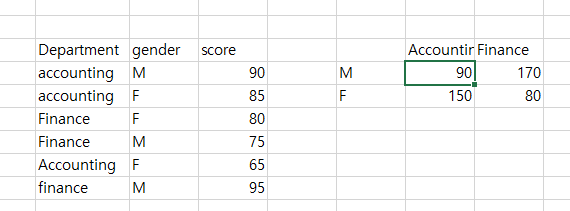
So far, we’ve only calculated vertical array values, so it’s not very different from SUMIFS.
But SUMPRODUCT can also handle vertical × horizontal condition values.
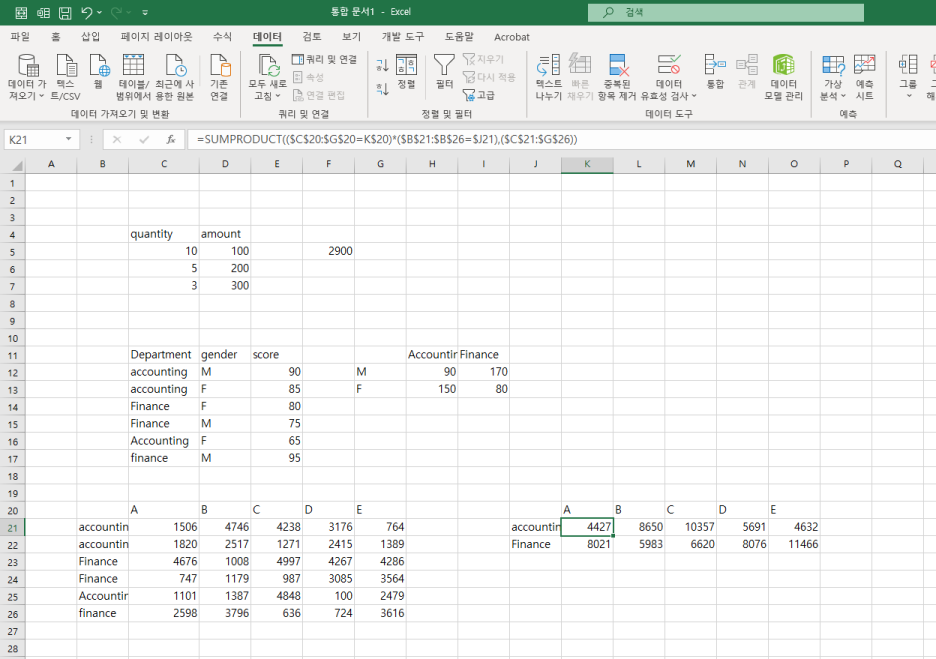
=SUMPRODUCT(($C$20:$G$20=K$20)*($B$21:$B$26=$J21),($C$21:$G$26))
=SUMPRODUCT((ConditionA="value")*(ConditionB="value"),(numeric_range))
You can also use it this way. Note that the “numeric_range” must match the full row × column dimension (minimum to maximum).
If you have any questions, please leave them in the comments.
728x90
'Excel' 카테고리의 다른 글
| ✂️ Excel LEFT, RIGHT, MID関数 完全攻略:文字列切り取りの技術 (0) | 2025.06.20 |
|---|---|
| ✂️ 엑셀 LEFT, RIGHT, MID 함수 완전 정복: 문자열 자르기의 기술 (0) | 2025.06.20 |
| 🇯🇵 日本語訳:🧮 Excel SUMPRODUCT関数 完全攻略:条件計算の最強ツール (0) | 2025.06.13 |
| 🧮 엑셀 SUMPRODUCT 함수 완전 정복: 조건 계산의 끝판왕 (0) | 2025.06.13 |
| Excel SUMIFS Deep Dive: Multiple Conditions? No Problem! (2) | 2025.06.10 |


